

This plug-in is designed to present an audio album or playlist in a consistent, visually friendly format. It extends the WordPress playlist function by adding the ability to display cover art, track descriptions, reviews, purchase options, production details, and additional notes. It also allows to exclude your album pages from search engine crawlers and site search if you’re creating playlists of songs for private use.
Global Settings
Jamco Media Albums has an extensive set of settings that will control how your albums are presented on your site, along with controls for managing track metadata, site search and web crawlers.
General Settings
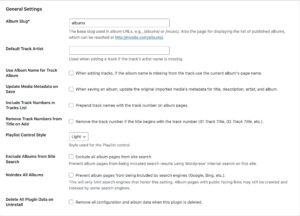
Album Slug
Sets the name portion of the plug-in URL when viewing the list of albums. Default value is albums.
Default Track Artist
Value to use when adding tracks to an album if the track’s artist metadata field is emtpy
Use Album Name for Track
If the track’s album name is missing, use the current album’s name as the track’s album.
Update Media Metadata on Save
When checked, the track data that you’ve entered will overwrite that track’s metadata when you save an album.
Include Track Numbers in Tracks List
In the Tracks section of an album, prepend the track name with it’s numeric position in the album.
Remove Track Numbers from Title on Add
If the tracks you’re adding to an album use the track number as a prefix (e.g., 01 My Song, 02 My Next Song, etc.), remove that numeric prefix. 01 My Song becomes My Song.
Playlist Control Style
Choose between the WordPress Light or Dark playlist style.
Exclude Albums from Site Search
If your albums are private, you can choose this to exclude all albums from showing up in your site search results. When checked, all albums will be excluded. If not checked you can set any individual album to be excluded from site search.
Noindex All Albums
Prevent all albums from being indexed by search engine crawlers. When checked, all albums will have the metadata option for noindex added. If not checked you can set any individual album to be excluded from being indexed. Note that not all web crawlers respect this setting.
Delete All Plugin Data on Uninstall
Check to remove all plugin files and database entries when uninstalling the plugin. This will not delete uploaded media files.
Section Headings
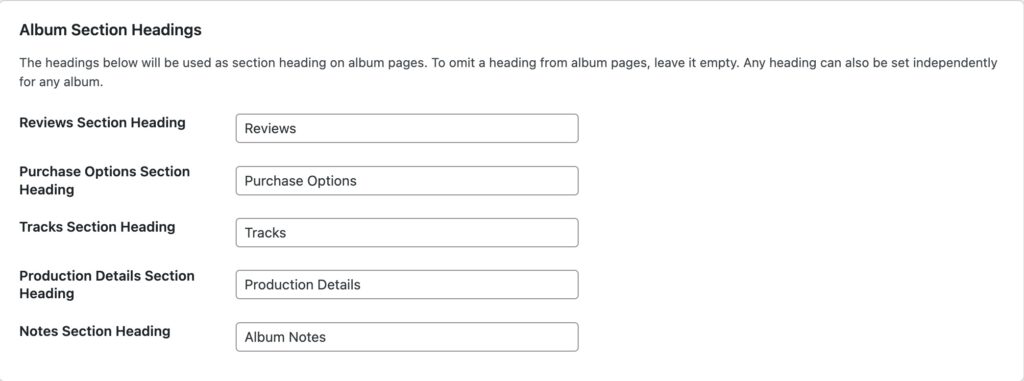
Default headings used for each section on an album page. These can be overridden on any individual album.
Album List

Text used for the heading when viewing the album list (archive), and for generating links from the album list to each album.